If you run a business, someone has probably tried to sell you software already. Maybe it was a sleek cashier system. Maybe it was an "all-in-one" app promising to fix your books overnight. Maybe you've just heard the names floating around and wondered if you're falling behind by not using any of them.
Before I tell you what those software types are, let me tell you how I learned to understand them in the first place. Because I didn't learn it from a seminar. I learned it behind the counter of our family's sari-sari store.
It Started With a Sari-Sari Store
We've had a sari-sari store since I was in elementary, maybe early high school. My father started it. It was small, and honestly, I didn't pay much attention to it back then. I was just the one who watched the store. The sari-sari store is one of the most common businesses in Filipino life, and to me, it was just part of the house.
Then came senior high school.
In the second semester of Grade 11, we had a subject called accounting. I had no idea what it was. I didn't even know "accountant" was a job. And if you're a business owner, you probably have the same misconception I used to see everywhere: when you hear the word accounting, your mind jumps straight to compliance. DTI. SEC. BIR. Mayor's permit.
But that's not what accounting is at its core.
Accounting is simply the process of recording and understanding the numbers of a business. How much you earned. How much you spent. How to report those numbers, analyze them, and actually understand what they're telling you. That's it. It isn't about taxes. It isn't about compliance. It represents the numbers of the business, nothing more and nothing less.
Once that clicked, accounting became one of my favorite subjects. I loved it so much that I enrolled in a Bachelor of Science in Accountancy in my first year of college.
Eventually, I dropped out.
But I refused to let what I knew about accounting die with that decision. I was almost desperate to keep practicing it, so I did the only thing I could think of: I experimented on our own store.
I started writing down our sales. Tracking every sale. Tracking the inventory. And little by little, I moved from pen and paper to actual applications, the same kinds of software businesses use today.
That habit became my trademark. If we're friends and you're a business owner, and I visit your store, I will almost certainly ask you: What do you use to track your sales? Your expenses? How do you track the cost of your projects? People remember me for that question.
Because that's what I did through senior high and early college. I practiced on our store again and again, from small scale all the way to becoming a virtual assistant with large clients. I kept practicing until I understood how software actually works inside a business.
And somewhere along the way, I discovered something important.
The software that worked for our store didn't work for a real estate business. The software used in real estate didn't fit a trucking business. And the software for trucking didn't fit a food delivery business. They were completely different worlds.
So I started categorizing them. Not to sound smart, but so that the business owners I talk to could finally understand what kind of software they actually need.
Before You Choose Any Software: Two Criteria That Matter Most
Before we even talk about software types, you need to answer two questions. Whether a tool is free or paid, whether it's popular or not, all of that is a bonus. These two questions are the foundation.
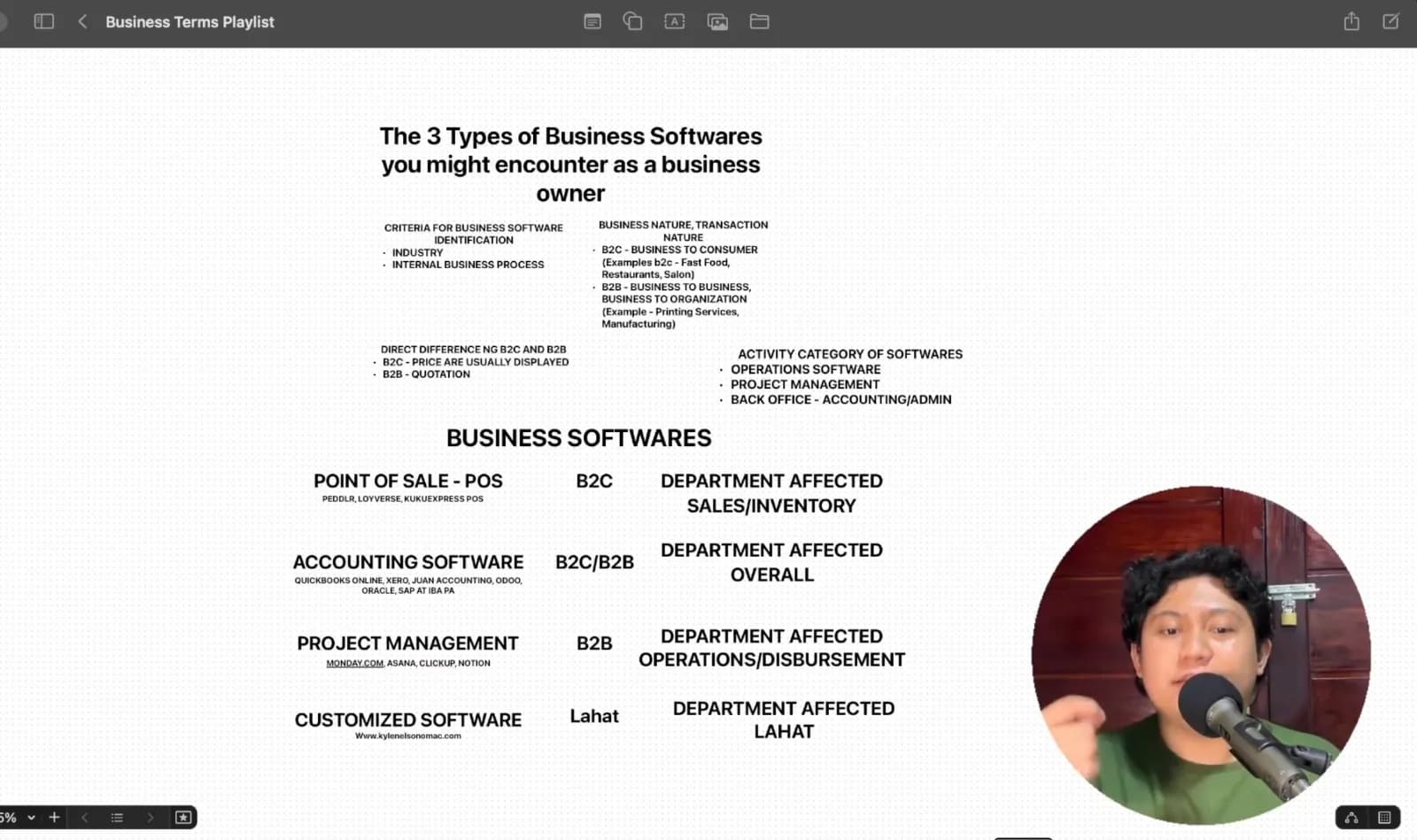
Criterion 1: Know Your Industry
The very first thing you need to identify is the industry you belong to.
During the live session where I first shared this, one of the business owners in the chat runs a burger business. Her industry is food. Another runs a real estate development and construction business. Another works in software development and services.
Here's why this matters so much: once you know your industry, you already know about 50% of what software you need. If you run a burger business, you can literally search, "What software do I need to run a burger business?" and you'll get a long list of relevant answers. Your industry narrows the field instantly.
Criterion 2: Have an Internal Business Process (Even a Manual One)
I've said this many times: the two things I focus on are systems and software. And here's the uncomfortable truth about how they relate.
You can have a system without software. But software is useless without a system.
It's that blunt. Software without an internal process is worthless.
Let me make it practical. Say a customer walks into your burger stand and orders a B1 burger. What happens next?
Do you collect payment first? Do you write the order down? Do you cook it first and collect later? Or must they pay before you start cooking?
It sounds like such a small thing. But the order of those steps is everything in a business.
I once had a friend, also in the food business, ask me what software she should use. I already knew her industry. So my next question to her was about her internal process: Is it pay later, or pay as you order? Do customers pay after the food is served? Do they pay before? Or do you serve first and just add everything to one bill if they order more?
Because depending on that answer, the software I'd recommend changes completely.
B2C vs. B2B: The Business Nature That Shapes Your Software
There's one more layer before we get to the software itself: your business nature, or transaction nature. There are two main types.
B2C: Business to Consumer
A B2C business serves individual people directly, the end consumer. A burger business sells burgers to the person who will actually eat them. When you order at your favorite fast-food branch, that branch is B2C, because it sells directly to individuals like you and me.
Fast food, restaurants, salons, groceries: all B2C.
B2B: Business to Business
A B2B business serves other businesses, or organizations. Your customers aren't individuals.
The best example is a printing business that only serves other businesses: making signage and billboards for companies. (I honestly can't imagine an individual commissioning a billboard. Maybe a politician, but even then, they usually represent an organization.)
Manufacturing is another classic example. A manufacturer rarely sells directly to consumers. It sells to distributors, and those distributors are businesses too. That relationship is B2B.
Here's a hypothetical to connect the two. Imagine that burger business supplies burger patties to a big fast-food chain. The burger business selling to the chain is B2B. The chain selling burgers to us is B2C.
Some businesses are hybrid. A salon is B2C because it serves individual customers. But the transaction between the salon and its supplier of shampoos and hair color is B2B. The same goes for the burger business: if you're hired to supply 100 burgers to an event and the organizers distribute them, that's B2B, because you're acting as a supplier. But if you set up your own booth at a bazaar and sell directly to attendees, that's still B2C.
The Easiest Way to Tell the Difference: Quotation vs. Displayed Prices
If you've ever heard the word quotation in your business, you're probably operating B2B.
A quotation is a document you give your customer so they know how much you'll charge for the service they're requesting. In my own multimedia business, when a company requests a photo shoot, video shoot, and lights and sounds, I send them a quotation.
In B2B, prices vary. They're often customized. My photo shoot rate isn't fixed at one number. If the shoot is in another location, I add a transportation fee. I add a mobilization fee, because I'm bringing cameras and equipment. It depends on the job, and all of that goes into the quotation.
In B2C, prices are usually displayed. At a burger stand, there's a menu posted above the counter with fixed prices. At a salon, the price list is often right by the door. At a fast-food chain, you already know how much each meal costs before you reach the cashier.
So ask yourself: Are your prices displayed, or do you send quotes? That answer tells you a lot about what software you should be using.
Business Software Type 1: Point of Sale (POS)
Picture yourself at a grocery store. You grab a cart, pick the items you want, and head to the cashier. Everything the cashier is tapping and punching, and that little machine with the thermal receipt printer on the side, that's a point of sale system, or POS.
A POS is built for recording transactions quickly. It's made for fast-moving businesses. That's why POS is best for B2C.
You've probably heard the phrase "punch the sale." That's exactly what a POS does. You punch your sales into it.
Departments affected: primarily sales and inventory.
If you're using a POS, chances are you're tracking your sales, your inventory, or both. Say you run a grocery store and you have five cans of sardines in inventory. You punch in a sale of two. The system automatically updates your inventory to three, because two have been sold.
So if your business is retail or B2C, there's a big chance a POS is what you need.
Some POS options I know of that have free versions include Loyverse and Peddlr. And one of the newest forms of POS you've already seen: the self-service kiosks at fast-food chains, the big touch screens where you place your own order. That's a POS too.
For the burger business owner in the chat, who writes down orders first and collects payment later, I suggested exploring these, because she could punch orders in directly instead of writing them by hand.
Understanding Where Software Lives: Operations, Project Management, and Back Office
Before the next software type, it helps to understand that software can be categorized by the department it serves. I call this the activity category of software, and there are three:
Operations software: used in daily operations. The POS at the cashier is operations software.
Project management software: used to track the progress of projects or of each employee's tasks.
Back office software: where accounting and admin live.
These three should be connected. All the numbers from operations and project management should flow into the back office.
But access should be restricted. Project management should only see a limited part of operations. Operations shouldn't see the back office. The back office can see everything, because that's where the prices, the expenses, the total income, the gross profit, and the net profit live. That information is confidential.
Business Software Type 2: Accounting Software
A POS is not accounting software. That's a common mix-up. POS belongs to operations. Accounting software belongs to the back office.
Accounting software works for both B2B and B2C. Every business has accounting, because every business has sales, expenses, investments, numbers, and money. As long as there's money, there's accounting.
Department affected: overall.
Accounting software is where everything lands: what operations produced, how much operations spent, what each project cost, how much went to payroll, how much you sold. It all falls into one place.
Examples include QuickBooks Online, Xero, Odoo, Oracle, and SAP, plus a Filipino-made accounting software I personally use. These are the heavyweights that can track an entire business.
But here's the catch: some accounting software can't handle what operations software and project management software do. Which brings us to the third type.
Business Software Type 3: Project Management Software
I believe project management software is truly B2B territory, because it's built for larger scale work.
Departments affected: operations, and to some extent disbursement.
Project management software has one core purpose: to track progress. And that tracking can be external or internal.
External: tracking projects you do for customers. Say a client commissioned a large billboard. In your project management tool, you'd see exactly where it stands: still in layout, already printed, out for delivery, or delivered. The real estate developer from the live session is another perfect example. Land development projects are ongoing, and project management software shows the progress of each one.
Internal: tracking your own team. Imagine Sales Team A has a monthly goal of 100 million in sales. In your project management software, you can see that by mid-month they've reached 50 million and need 50 million more to hit their goal. Or your internal goal is to hire five employees across different departments. That can live in your project management tool too.
Examples include Monday.com, Asana, ClickUp, and Notion. My personal favorite is ClickUp, because it's free. I've used Monday.com and ClickUp myself.
In my experience, project management tools are used heavily by US companies but not as much in the Philippines yet. I use one personally. As one fellow VA pointed out in the chat, project management is a big part of virtual assistance work.
The Secret Fourth Type: Customized Software
I said there were three. I kept a fourth one secret. (Honestly, I almost forgot to mention it.)
The fourth is customized software.
Department affected: all of them.
Customized software is any software you, as a business owner, commission to be built for your own business. Just yesterday, I visited a fellow business owner in Tagaytay who had a business software custom-built for her operations. Anything built specifically for you is customized software.
When I build customized software, I connect everything. The operations software, the project management software, and the accounting software all become one system. You can use it as a POS, as accounting software, as project management, and every number is centralized in the back office.
This is where businesses go when ready-made software feels too limited, when the features just don't fit how the business actually runs, and they'd rather build their own.
None of This Matters Without an Internal Process
Now your eyes are open to the different types of business software, and you can start figuring out what applies to you: POS, accounting software, project management, or customized software.
But please remember this, because it's the most important part.
All of this is worthless if you don't have an internal process.
Remember the question I asked earlier: pay as you order, or pay later? If your answer is, "It depends on the customer. Some pay first, some pay after," then you don't have a structured, formalized internal system yet. And that needs fixing.
Because how will you step away from the business? How will you delegate? Your cashier will be confused. You'll be prone to mistakes. If you haven't designed when the customer should pay, the person you assign to that role won't know either.
For small food businesses, I personally recommend pay as you order. Here's why.
Picture a group of five customers. They order five of the same meal, one each. You write it down and let them pay later. Thirty minutes of hanging out, they order more. If they're your only customers, no problem. It's easy to track, easy to list, easy to record.
But when four or five groups are doing the same thing at the same time, you'll get lost. Your operations slow down. It's far better if they pay upfront before you serve. You don't have to chase anyone for payment, because it's already paid.
Pay later works for fine dining, where a waiter is assigned to each table and nothing gets overlooked. But for small-scale food businesses like burger stands, shawarma stalls, and even carinderias, pay as you order means less manpower, less stress, and the peace of mind of knowing everything has already been paid.
That's why I don't just sell software right away. Often, I recommend ready-made tools first. Because what matters to me is that you have an internal process. The right software only amplifies a process that already works.
If you're struggling with your internal process, send me a message and let's polish it together, so the standard, proven processes that businesses use can be applied to yours.
To know more about my services and writings, connect with me here: https://www.kylenelsonomac.com/
Faith without action is Fiction.